

Formerly known as Cloud Meeting + Calling EA Pack, it is now called Webex Suite. … The call, meeting and messaging suite existed before, but now, with Slido’s polling/QA and Events to enable the best hybrid work experiences. Users can host virtual events, such as webinars, training sessions and meetings for everyone.
Calls, meetings, messaging, surveys and events: that’s what the new Webex Suite offers with a single purchase and at competitive prices.

Being able to make calls with any of our voice solutions from within the Webex application, collaborate with messages and share files, or create or join meetings seems logical enough. But to this we have to add our survey tool Slidofully integrated into meetings; or the new Webex Events 2.0, more complete and powerful than ever.
It’s all about having everything you need to collaborate in teams in a single package, to which we can add other of our solutions such as the “Contact Center” or Webex video equipment.
Now, all employees can experience the full power of the Webex platform in a single offering with calls, meetings, messaging and events. With Webex Suite, new and existing customers also receive powerful integrated capabilities such as polling (Slido), gesture recognition, noise removal, closed captioning, Webex Assistant and more.
If you need features such as real-time translation, Cisco Call Plans or Contact Center that are not available in this offering, CISCO has made it very easy to purchase these paid add-ons in addition to Webex Suite.

Slido surveys and questions and answers
To create a more engaging meeting experience, Slido’s QA capability is now natively integrated into Webex. You can take advantage of 6 diverse voting options and live QA to create more engaging meeting experiences. No additional fees or configuration upgrades – it’s just part of Webex Meetings and Webex Suite!
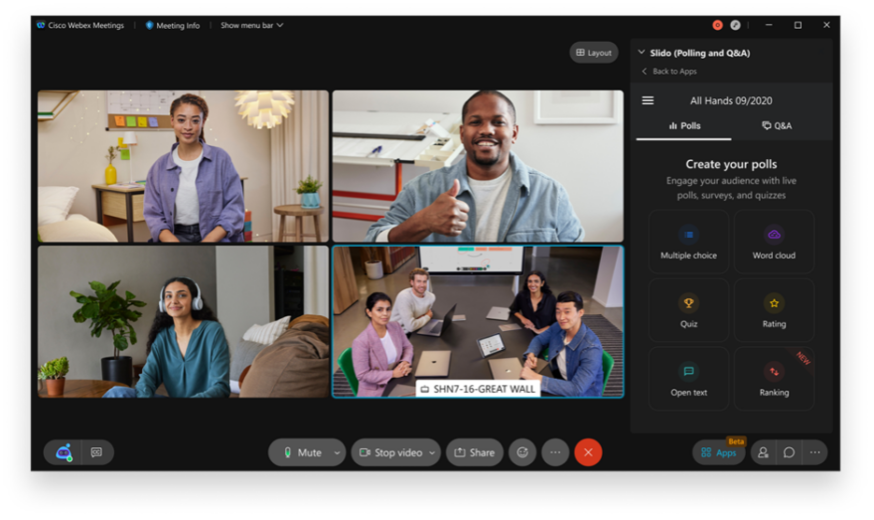
Customized designs: stage view only
Webex custom layouts give users a lot of flexibility to focus on what they want to see with drag-and-drop capabilities. Now, as a host or co-host, you can select your audience’s view. Limit participants’ view to the stage only, so everyone can see what’s on stage and limit visual distractions from other participants or panelists.
Webex meeting planner controls to disable for selected participants
Prevent unwanted participant videos from becoming a distraction in your meeting. Hosts and co-hosts will have more moderation control to mute or unmute an individual participant’s video. The remote participant can turn the sound on, but this option allows hosts to quickly remove visual interruptions at any time.

Posting of messages
The most requested messaging feature by users is now available: pin messages! It allows important information to be found quickly and easily in your individual and group spaces. Any user can pin a message, link or content to a space and select pinned messages to be displayed in the new pinned message header.

Space linkage
Now, when composing a message, you will be able to link a space in the same way you link a user, using @mention. You will now get a list of users in your space, as well as a list of spaces you are part of. When you post a space link, your contact will see the name of the hyperlinked space for easy access.


Calling Chromebooks (Webex app)
Chromebooks are popular with students and businesses using Google’s productivity tools. Unified CM calling and Webex calling are now available on ARM and x86 Chromebooks. Users can use the Webex app on Chromebook and their Android phone at the same time.
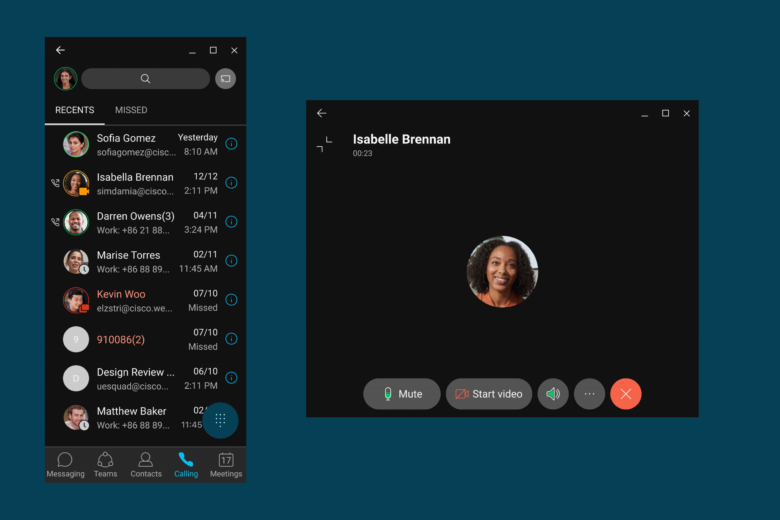
Improved call recording with Webex Calling
Webex now offers convenience call recordings for all Webex Calling and UCM Cloud users with Dubber Go. The integrated Dubber Go subscription will allow free access to call recordings, which include: Unlimited call recordings that will be available for 30 days for playback and download.
Get calling plans from Webex.com
Webex offers calling plans that include phone numbers for each user, advanced calling features, and unlimited local and national calling with international calling (subject to per-minute usage charges). You can make and receive calls with your business number. Choose the plan that’s right for you and get started in minutes. Available in EMEA in 2022.

Introducing the new Webex events
The new Webex Events service offers a best-in-class virtual event experience that is video-centric, intelligent and easy to use. Hosts choose between webinar mode for a highly engaging, interactive event and webcast mode for events with limited attendee interactions.
Hosts, panelists and attendees get enhanced experiences such as modern scheduling, Webex Assistant, in-meeting feedback, gestures and more at scale. Webinar mode supports up to 10,000 attendees and the new webcast mode lets you scale large events to 100,000 people.
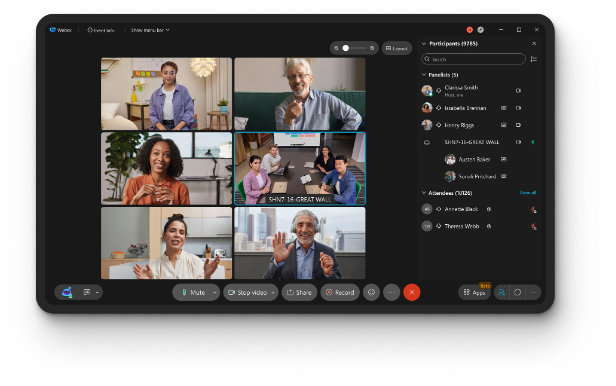
Cisco Webex Suite, the industry’s first hybrid work platform that combines meetings, calls, messaging, polling and events in a single offering, with up to 40% lower pricing compared to other solutions purchased ‘a la carte’.


